Manual
Library
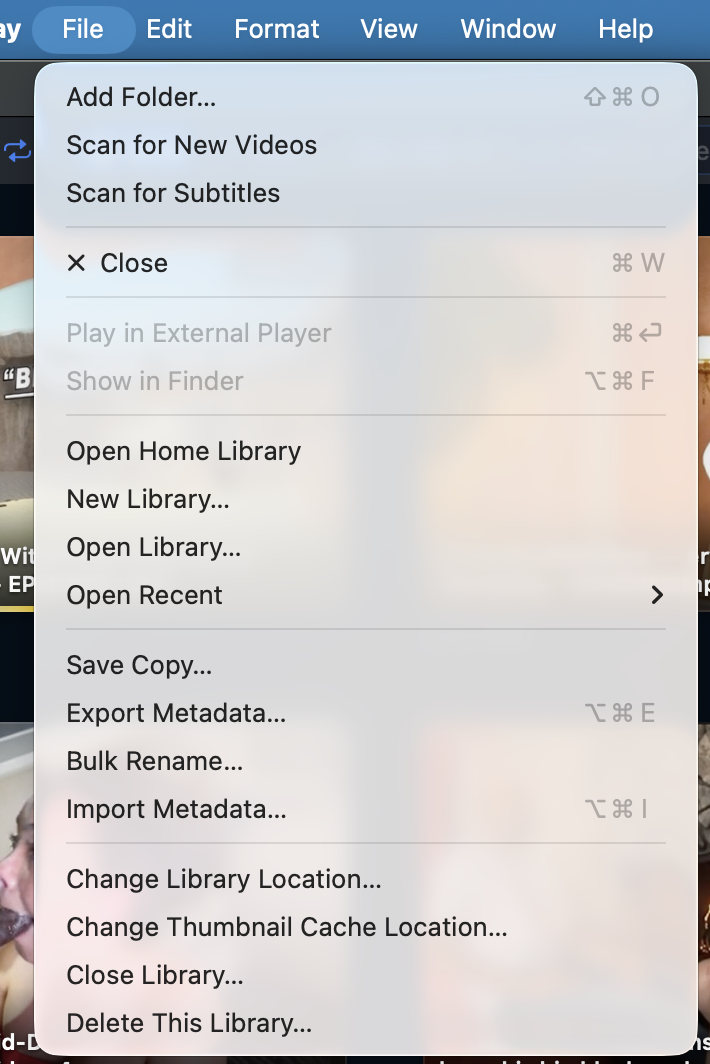
The File menu holds everything about the library itself: which folders Skagway watches, scanning for new files, and creating, opening, copying, or deleting .machii library files.
Add your video folders
- In an empty library, drag files or folders onto Drag videos here, or click Add Files….
- Or choose File → Add Folder… (⇧⌘O), pick folders, and click Scan.
- Skagway indexes recognized videos (subfolders included) and builds thumbnails in the background.
- Added folders are registered as Data Sources automatically.
Manage those folders under Settings → Data Sources. Your files stay where they are on disk.
Keep the library current
- Scan for New Videos — checks watched folders for files added since the last scan. New ones appear in Last Added.
- Scan for Subtitles — re-checks the current view for matching .srt files and updates subtitle badges.
 Scan for New Videos is also available as a button on the toolbar.
Create, open, and switch libraries
- Open Home Library / Create Home Library — the library at your chosen home location.
- New Library… — create a separate .machii catalog.
- Open Library… — open any existing .machii file.
- Open Recent — recently used libraries.
- Change Library Location… — run the first-launch location setup again for the catalog.
- Change Thumbnail Cache Location… — move this library’s thumbnail cache.
- Close Library… — close the catalog. Reopen it from the File menu.
Switching libraries does not delete the one you left. Skagway restarts briefly.
Copy or delete the library file
- Save Copy… — writes a timestamped duplicate wherever you choose. The original stays open; open the copy later with Open Library….
- Delete This Library… — deletes the .machii catalog after a confirmation. Your video files are not touched.
Backups and moving metadata between libraries are covered in more detail. See the Export / Import page.
Which files count as video
- Out of the box Skagway recognizes mp4, mov, m4v, avi, mkv, wmv, flv, webm, mpg, mpeg, 3gp, ts, mts, vob, ogv, divx, dv, m2ts, and mxf.
- Add or disable extensions under Settings → Extensions.