Manual
Filter
Narrow the library with a few clicks using Quick Filter, or build precise boolean rules with Advanced Filter. Both work on top of search and sorting.
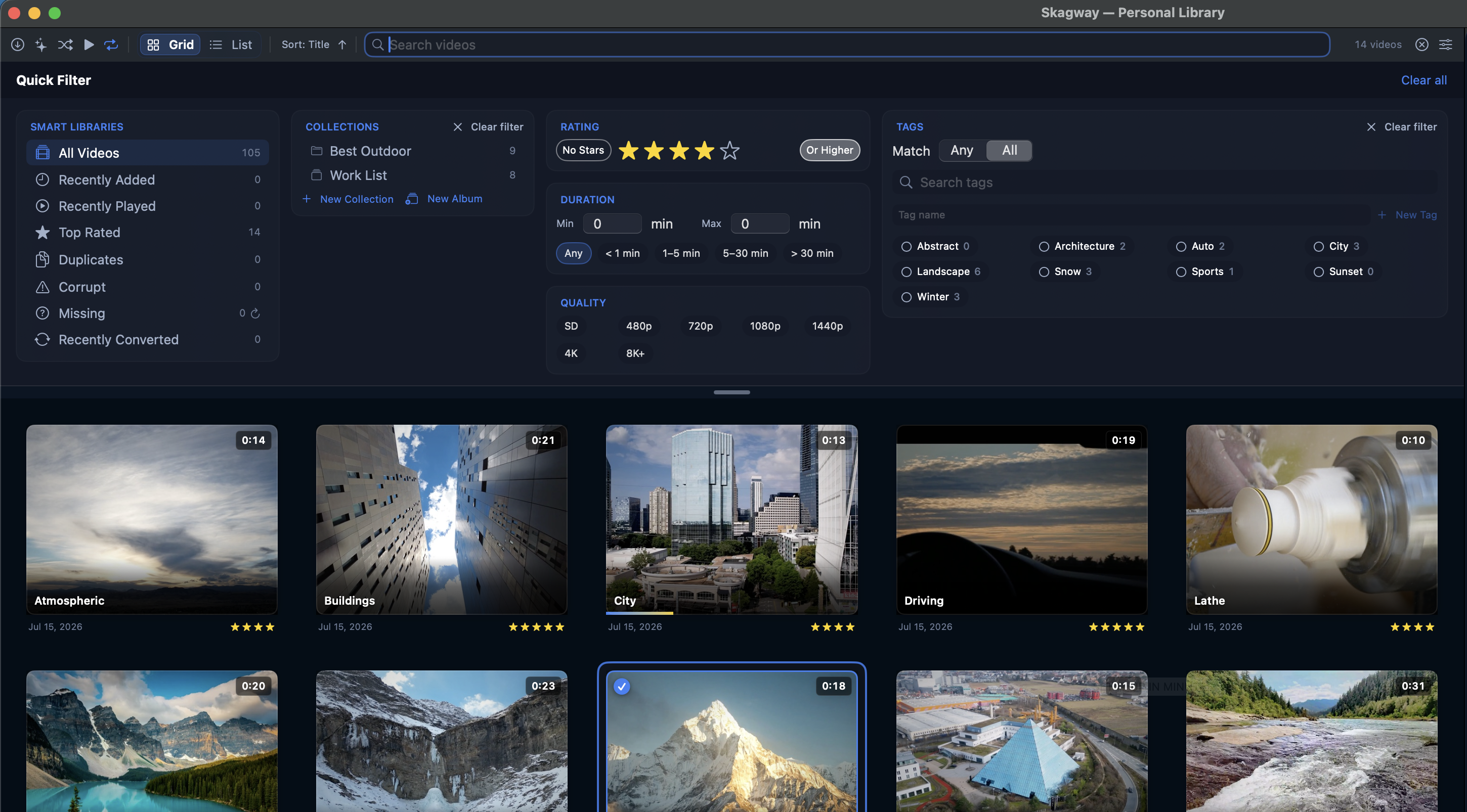
Quick Filter (⇧⌘F)
- Click the filter button in the toolbar or press ⇧⌘F to open the Quick Filter drawer above the grid.
- Combine a Smart Library, collection, or album with rating, duration, quality, and tags.
- Click No Stars or a star rating. Or Higher includes that rating and every higher one.
- Tags can match Any or All of the selected tags.
- Everything you pick applies together. Search still works on top.
Smart Libraries
- All Videos — the whole library.
- Recently Added / Recently Played — videos from the last N days (N is set in Settings → Library).
- Top Rated — videos at or above your chosen star threshold.
- Duplicates — videos whose file content matches another video, grouped by fingerprint.
- Corrupt — files Skagway couldn’t read metadata or a thumbnail from.
- Missing — files whose path no longer exists (unmounted drive, moved file). Click the refresh arrow to rescan.
- Last Added — videos found by the most recent Scan for New Videos.
- Recently Converted and Last Metadata Import appear after you use re-encoding or metadata import.
Choose which Smart Libraries appear under Settings → Library → Smart Libraries.
Advanced Filter (⇧⌘V)
- Press ⇧⌘V to switch the drawer to the Advanced Filter rule editor.
- Build rules on any video attribute or custom field. Operators change to match the attribute.
- Group rules with ALL or ANY — for example (Tag is Vacation AND Rating ≥ 4) OR Tag is Favorite.
- Click Save as Collection… to keep the rule set permanently.
Quick Filter and Advanced Filter are exclusive — opening one clears the other, so they never combine unexpectedly.
Clearing filters
- With the drawer closed, active filters appear as removable pills above the grid — click a pill’s × to drop just that condition.
- Click Clear all in the pill row or the drawer header to reset everything.
- View → Clear Filters (⌥⌘C) does the same from the keyboard.